The latest update to Google Messages brings two major enhancements: the ability to share Google Keep notes and custom chat themes, part of the September Android Drop.
Shared Google Keep Notes
With this new integration, users can easily add a Google Keep note during a conversation by tapping the plus button. This straightforward feature offers a significant boost to group dynamics, enabling all participants to view, edit, and contribute to shared notes. Whether it's a grocery list, plans for a weekend getaway, or any collaborative effort, this shared note functionality fills a gap that often exists in group chats. Important information frequently gets lost amid a flurry of messages, and this tool aims to streamline that process.
Consider how it often plays out in group chats. Someone throws out an idea, followed by another who adds their thoughts. Before long, the key points are buried under an avalanche of emojis and unrelated banter. This integration offers a solution, putting critical info in one easily accessible location. Users can summarize discussions or tasks, making sure everyone stays on the same page and can contribute in real time — quite efficient when group coordination is key.
This new feature could transform how teams communicate in both professional and social settings. It encourages collaboration and ensures that significant details don’t slip through the cracks. If you're working in this space, you’ll likely see more organized discussions and clearer communication once users start fully embracing this capability.

Custom Chat Themes
Google Messages users can now set personalized backgrounds and colors for individual chats. Options include curated wallpaper collections like Animals, Landscapes, and Space, or users can upload their own photos. This personalization goes beyond just color changes; the chat bubble colors automatically adjust to match the selected theme. For example, a beach photo could be paired with summer-themed colors for a vacation chat.
This blend of functionality and aesthetics might seem trivial at first glance, but it actually reflects a larger trend in messaging apps. Personalization has become increasingly popular, as users seek unique ways to express themselves digitally. Creating a space that feels inviting and personal can enhance the user experience, encouraging more frequent communication. People often overlook the psychological impact of a chat interface—having a visual representation that resonates can make users feel more connected.
The ability to upload personal photos adds a deeper layer of individuality. Users aren’t just confined to predefined themes; they can bring their memories and preferences into each conversation. That's a compelling proposition for many—making communication not just a utilitarian function, but an enriching experience as well. This could lead to a profound shift in how people interact with their messaging apps, as they seek out features that resonate with their identities.
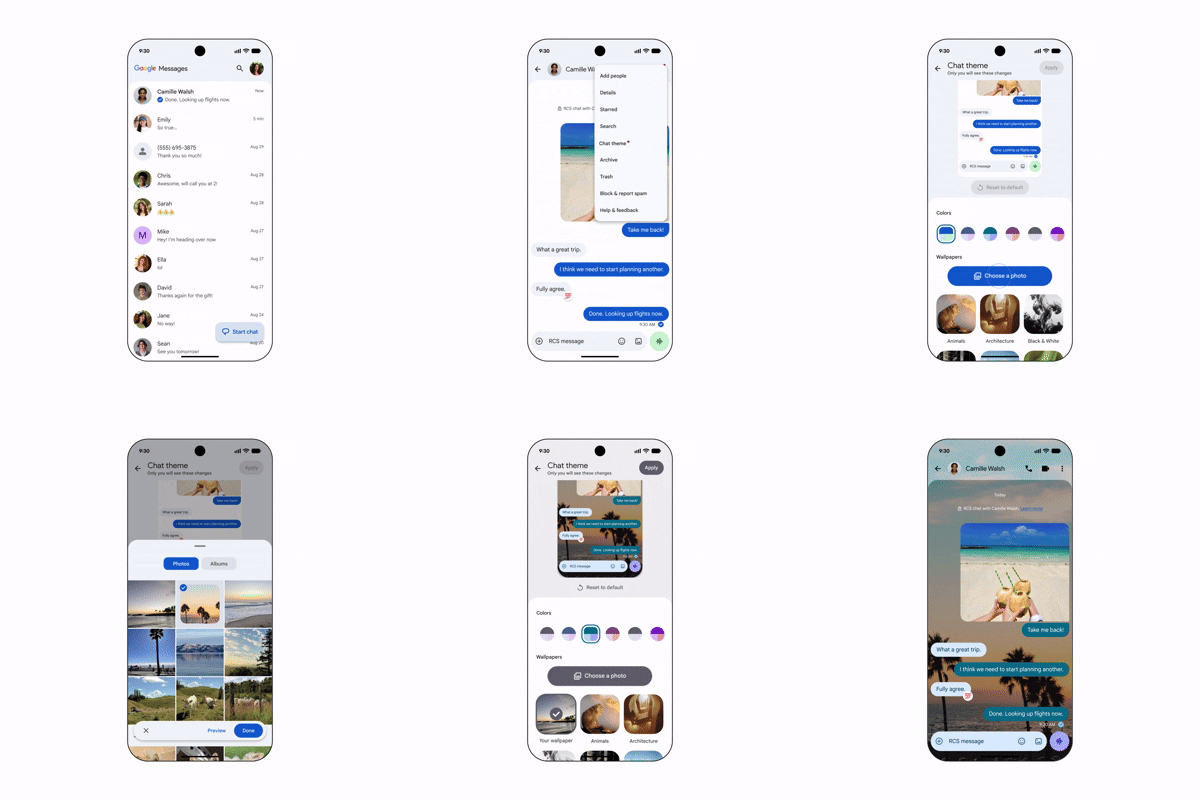
Google had previously hinted at these custom themes in a community post, and their arrival in the September Android Drop confirms this move. This advance isn't just a whimsical addition; it reflects a long-standing recognition within the digital communication sphere that users crave personalization and creativity. As the update rolls out, expect more users to adopt these features, enhancing communication and collaboration in Google Messages.
Implications and Future Outlook
The introduction of these features signifies a noteworthy shift in how Google is positioning Google Messages against competitors like WhatsApp and Telegram. Both of these platforms have long emphasized customization and collaborative functions, and Google appears intent on catching up. While these features won't redefine messaging apps, they do provide essential tools that can enhance user engagement and satisfaction.
As users increasingly seek platforms that offer more than just basic messaging, Google has made an important strategic move. Users expect more flexibility and functionality from their digital communication platforms. If successful, these features could attract users who prioritize both collaboration and personalization in their messaging experience. And yet, the success of these upgrades will rely heavily on user adoption—will Google Messages users maintain active engagement with these features, or will they fall by the wayside?
(and this is the part most people overlook) A lack of adoption could isolate Google in a rapidly evolving market, where users are increasingly tempted by apps that offer not just function, but flair. It’s one thing to release new features; it’s another to see them embraced. For that, Google will need to ensure smooth integration and consistently enhance user experience across the platform.
In conclusion, while these updates are a welcome addition to Google Messages, they represent just a step in a larger journey to remain relevant in a saturated app market. Users will ultimately voice their opinions through engagement. How Google responds to feedback and iterates on these features will be crucial for their long-term success. Expect to see ongoing updates aimed at refining these capabilities as both Google and its users navigate this complex messaging terrain together.