Google's September Android Drop emphasizes improving user experience, particularly in the realm of accessibility. The focus on enhancing usability caters to an increasingly diverse user base, ensuring that everyone—from casual users to those with disabilities—can navigate their devices with greater ease. Among this month’s new features, two noteworthy additions stand out: Motion Assist and Guided Vision. Both aim to enhance comfort and usability for Android users, reflecting a shift towards more inclusive technology design.
Combatting Motion Sickness with Motion Assist
Motion Assist addresses a common yet often-overlooked issue: motion sickness caused by using mobile devices while on the move. This experience can be uncomfortable for many users, particularly those who frequently engage with their devices in cars, buses, or trains. Google’s approach with Motion Assist is innovative—introducing a dynamic bubble overlay that shifts in sync with the vehicle's movement. This clever adaptation allows users to reconcile their visual input with the sensation of motion, potentially alleviating symptoms of motion sickness.
The bubble overlay is not just a superficial effect; it’s designed to provide visual cues that help stabilize the user’s experience while consuming content. When users find themselves engrossed in videos or gaming sessions, the shifting bubbles offer a sense of balance, making the experience less distressing. This is an important advancement for a demographic that may have otherwise avoided mobile engagement during travel. For Google, this is a notable pivot from their traditional focus on aesthetics and functionality alone, aiming instead to address specific issues that affect user comfort.
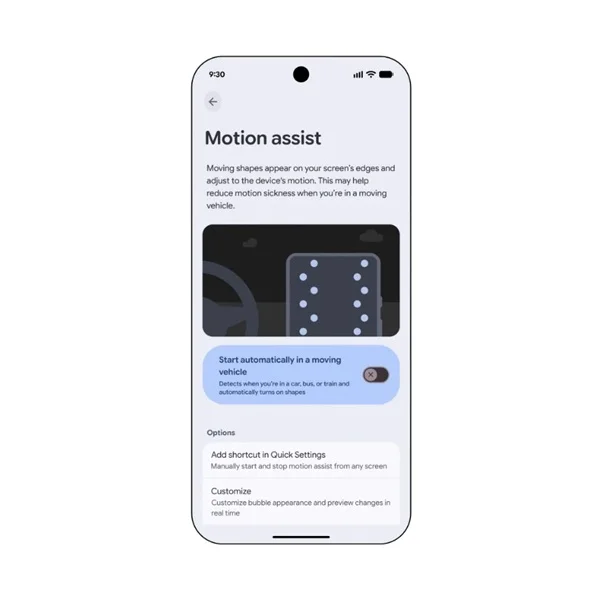
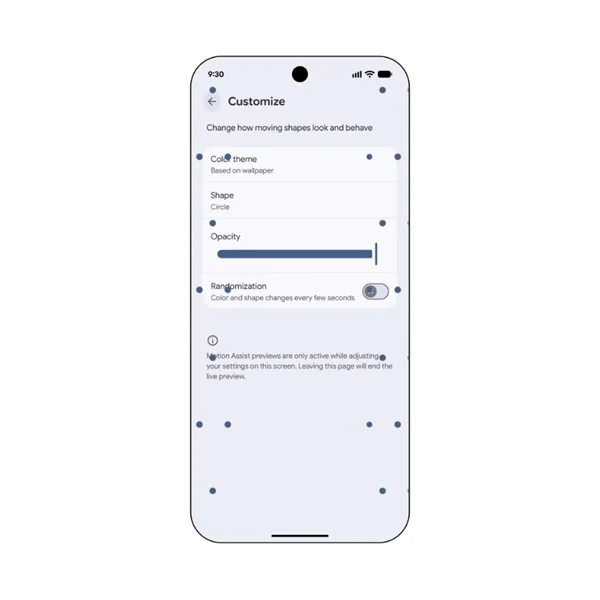
Users can easily activate Motion Assist through the Quick Settings menu, making it accessible and straightforward to engage. Moreover, the feature can detect when users are in motion, automatically adjusting to ensure maximum comfort without requiring constant manual input. The customization options enhance this experience further; users can change the colors and shapes of the bubbles, allowing for personalization that can make the adjustment feel even more effective. This reflects a significant understanding from Google about user comfort—something that can often be forgotten in tech development.
Improving Accessibility with Guided Vision
Guided Vision represents another stride in Google’s commitment to enhancing accessibility. Utilized through Google's Gemini Live technology, this feature leverages AI to provide auditory descriptions based on what the camera sees. For users with vision impairments, this can be transformative—helping them navigate their surroundings with increased autonomy. The application of technology in this way is not simply about adding features; it's about creating contextually rich experiences that empower users.
Consider this scenario: you're at a grocery store looking for specific spices. Guided Vision can help identify these items and provide audio cues, which simplifies the shopping experience significantly. The technology can even instruct users on how to adjust their cameras if objects move out of their field of vision—a simple yet effective solution that indicates thorough consideration in design. This goes beyond offering basic assistance; it hints at a deeper understanding of user interaction with their environment.
The rollout of Guided Vision for devices running Android 9 or newer is eagerly anticipated. Once released, enabling Guided Vision will be straightforward, either through the Accessibility menu or via the TalkBack interface. This ease of access ensures that users won't struggle to find or activate the feature, further enhancing usability.
The Value of User-Centric Technology
These enhancements symbolize a significant shift toward prioritizing user needs, especially regarding accessibility. In an industry frequently dominated by flashy visual effects and opportunistic productivity tools, Google’s new features stand out. They address specific user challenges in ways that traditional tech updates often overlook. In a landscape where technology should ease daily challenges, advancements like Motion Assist and Guided Vision demonstrate a commitment to genuinely supporting diverse user experiences.
If you're working in this space, it's essential to recognize the implications of these updates. They suggest a growing acknowledgment within the tech community of the necessity for inclusivity and user-centric design. Companies that focus on comprehensive solutions to real-world problems are likely to resonate more with consumers. Users today are increasingly aware of and sensitive to how tech affects their daily lives. They want devices that don't just function—they need them to fit seamlessly into their unique contexts.
Future Outlook
As accessibility continues to gain traction in tech development, Google's adaptations this September could signal a larger trend. Companies are likely to face pressure to follow suit, integrating features that prioritize user comfort and inclusiveness. That said, the effectiveness of such features ultimately rests on user feedback and iterative improvements. Developers must remain vigilant and responsive to how these features perform in real-life scenarios to ensure they genuinely enhance user experience.
Since these features are being introduced now, their eventual impact on device usage patterns remains to be seen. Users may very well develop new expectations around accessibility features, demanding more from their devices in terms of comfort and usability. Watching how other tech giants respond to this shift will be interesting—there's much at stake, and we're only beginning to scratch the surface of what accessible technology can achieve.