Apple's upcoming iOS 27 emphasizes enhancing photographic capabilities, especially within the Photos app. Key additions like Spatial Reframing and Extend are designed to empower users, from casual photographers to those aiming for more refined edits. As smartphone photography continues to rise in popularity, the demand for user-friendly editing tools is paramount, and Apple seems to be answering this call by integrating features that reshape and redefine how users interact with their images.
Spatial Reframing
One standout feature, Spatial Reframing, enhances photo composition by allowing users to shift perspectives post-capture. This tool isn't just about changing how an image looks; it respects the original moment captured, promising only to generate new content from altered angles. In many ways, this feature acts as an artificial assistant, helping users recognize multiple perspectives they may have initially overlooked. Photography is as much about intuition and instinct as it is about the technical aspects. Thus, being granted the ability to navigate these perspectives after the fact could significantly change how amateurs and professionals alike approach their photography.
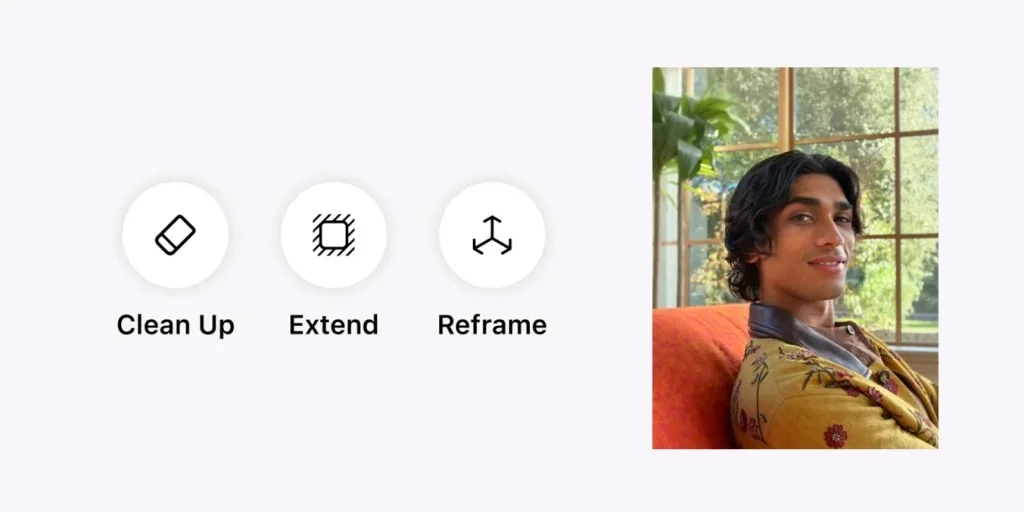
During an insightful interview with Tyler Stalman, Apple executives Della Huff and Jon McCormack elaborated on how this feature aims to refine memories instead of transform them. The intent is clear: enhancing the imagery while keeping the moment's integrity intact. By directly addressing the needs of users who want both artistic control and authenticity, Apple positions itself as a leader in consumer photo technology. This isn’t just a technical upgrade; it’s a philosophical shift in how imaging can meld creativity with authenticity.
Extend Feature
The Extend feature complements this functionality, enabling users to enlarge images by up to 25% on each side, allowing for better cropping and straightening. McCormack pointed out the rationale behind this limit—maintaining authenticity while providing some space for improvement. Photographers often face the frustrations of capturing fleeting moments that don't fit perfectly within the frame. By offering an option to enlarge, Apple is tackling a persistent annoyance that has plagued both seasoned photographers and casual users alike.
McCormack: “We’re trying to refine a memory you recorded… whether it's cropping closer or adjusting a tilted horizon, we give users that leeway.”
This feature is particularly beneficial for addressing common issues like horizon tilts, proving practical for everyday users who may lack advanced editing skills. Imagine the relief for someone who just captured a snapshot of a family gathering, only to realize later that the horizon is askew. The Extend feature could make it simpler to fix these discrepancies rather than forcing the user to turn to more complex editing software. This aligns well with Apple's ongoing mission to make advanced technology accessible to the average consumer.
Advanced Cleanup
Beyond these features, iOS 27 enhances the Clean Up capability, enabling users to eliminate distracting elements from their photos. Huff noted that this improved feature can handle more complex objects, maintaining accuracy to the original scene. Unlike certain older alternatives, which often left behind jagged lines or unsightly artifacts, this upgraded Cleanup function could very well become a go-to for anyone looking to elevate their photography without extensive skill or time investment.
McCormack summarized these advancements well, highlighting Apple's intention to democratize sophisticated photo editing. “These features provide users with extraordinary abilities. Users can accomplish tasks that once required professional skills while ensuring the essence of their moments remains preserved,” he said. This isn't merely about editing; it's about rewriting the rules on who gets to be a creator. Everyday users are no longer just passive consumers; they are also empowered co-creators of their narratives, able to harness technology in ways that feel deeply personal.
As these features roll out, they underscore Apple’s commitment to enhancing user control over personal memories, allowing for both preservation and perfection. The implications here stretch beyond convenience. If you're working in this space, consider how such tools can influence everything from social media sharing to professional portfolios. Enhanced editing capabilities could lead to an increase in user-generated content quality, further shaping the way visual storytelling is perceived across platforms.
Implications and Future Outlook
What this means for you as a user, potential influencer, or anyone involved in creative professions is significant. The barriers between amateur and professional photography are increasingly blurred. With tools like Spatial Reframing, Extend, and Advanced Cleanup, it seems anyone with a smartphone will soon be equipped to produce images that can rival those taken by seasoned photographers. This trend toward user-friendly editing tools could spur a new wave of creativity, inspiring users to experiment more freely with their photos.
However, there are concerns too. As the line between what’s candid and contrived blurs, issues like authenticity come to the forefront. It poses the question: How much editing is acceptable before a moment loses its truth? That's the part most people overlook. As editing technology becomes more advanced, this conversation will only grow more complex, requiring users to think critically about their portrayal of reality through images.
Watch the full interview for deeper insights, and share your thoughts on these new additions in the comments below.
Chance’s favorites:
- AirPods Pro 3: $179 (Reg. $249): Lowest price ever!
- Bring wireless CarPlay to any car
- “Apple: The First 50 Years” by David Pogue
- Logitech MX Master 4
- Belkin 3-in-1 MagSafe Charger
- Beats Woven USB-C Charging Cables
Follow Chance: Threads, Bluesky, Instagram, and Mastodon.


FTC: We use income earning auto affiliate links. More.